Open source Software: Instances FAQs
Frequently asked questions about how the instances work IRL.
- Nextcloud
- Software update frequency
- General information
- Profile visibility on Nextcloud
- General Information
- Common issues
- Installing Nextcloud apps
- Nextcloud + OnlyOffice
- Nextcloud + Collabora Online
- Nextcloud Talk
- Nextcloud data encryption with Server Side Encryption
- Nextcloud data encryption with Cryptomator
- How to create a Nextcloud App Password
- How to add a New User to Nextcloud
- Nextcloud Encryption with E2EE
- Nextcloud Mail - How to archive an email
- Nextcloud Mail - Unread mails
- Nextcloud Calendar and Contacts on mobile devices
- Installing and configuring LibreSign
- Nextcloud retention and tagging
- Nextcloud Mail search
- Nextcloud Mail Signature
- Vaultwarden
- Software update frequency
- How to invite a new user to Vaultwarden
- Setting up Vaultwarden on your mobile device
- Setting up Vaultwarden on your desktop
- Setting up Vaultwarden browser plugin(s)
- How to disable a Vaultwarden account
- BigBlueButton
- Software update frequency
- Time for the deployment of the instance
- Things to keep in mind for the best experience
- How to Download recorded videos
- Known Limitation: Logout with Keycloak SSO
- Bookstack
- Discourse
- Ghost
- Peertube
- Funkwhale
- Mautic
- Matomo
- GitLab
- Matrix
- Software update frequency
- Matrix handbook
- Integration with other platforms
- Data encryption
- Common issues
- WordPress
- Software update frequency
- WordPress development services
- Plugin maintenance
- Wordpress integration with Keycloak
- WriteFreely
- InvoiceNinja
- Mastodon
- Software update frequency
- Is it possible to modify the domain name for my Mastodon server?
- Common issues
- Mattermost
Nextcloud
Nextcloud is an open-source collaboration and file-sharing platform that provides secure cloud storage, file sync, and a wide range of productivity tools such as calendars, contacts, and collaborative document editing. It is a fully self-hosted alternative to proprietary cloud services, giving organizations complete control over their data and infrastructure.
Note: at Cloud68.co we do NOT develop this software and all the names and trademarks of the software are owned by the entity behind the project.
Software update frequency
For information about the way we handle software updates, please visit https://docs.cloud68.co/books/faqs-tech-support/page/scheduled-maintenance-software-updates.
General information
To learn more about our Nextcloud managed hosting service, visit: https://cloud68.co/instances/nextcloud.
More information about the project can be found here: https://nextcloud.com and the source code is available at https://github.com/nextcloud/server
User documentation can be found here: https://docs.nextcloud.com/server/latest/user_manual/en/
Profile visibility on Nextcloud
The steps below will allow you to configure with ease your profile visibility according to your privacy needs.
In order to manage your profile visibility on Nextcloud, you have to go to your Profile Settings by clicking on Settings on top right corner of Nextcloud.

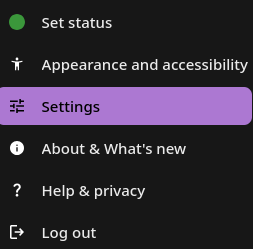
After clicking your profile icon, the menu below pops up. Click Settings.
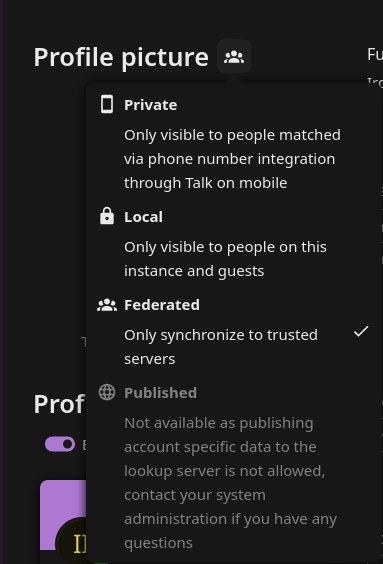
Once inside the settings, you will see a lot of fields with your information. Next to each field there is an icon, either a lock or something else as seen below.

When clicking the icon, you can see some options pop up. Amongst the options you have Private, Local, Federated, etc.
As per description if you want to have your information Private you can click Private. If you want to have your info visible to people on the same instance as you, choose Local and if you want federated servers to see your profile, you can choose Federated.
After you are done configuring the fields, on the bottom of your profile, click the "Edit your Profile visibility" button.
It will take you to this menu.
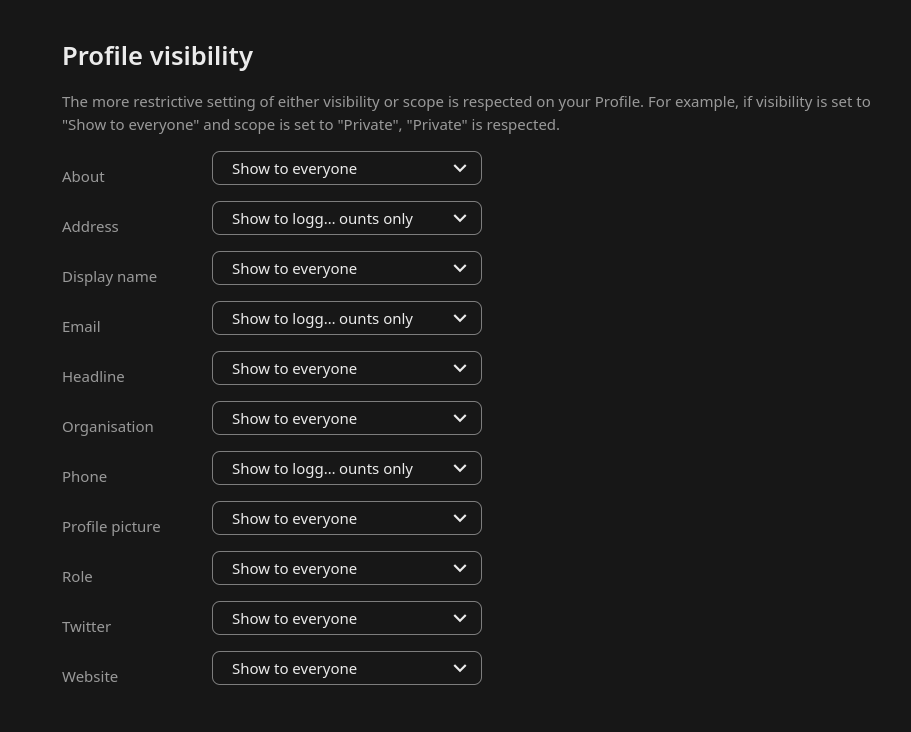
There are three options: Show to everyone, Show to logged in accounts only, and Hide. If you want your colleagues on the same instances to have access to your profile info, you can choose Show to logged in accounts only, otherwise you can Hide your info.
General Information
Some things that might help you while using your Nextcloud instance. To learn more about our Nextcloud managed hosting service, visit: https://cloud68.co/instances/nextcloud.
Manual
New Nextcloud user? Here is the user manual that will help you navigate your instance easier: https://docs.nextcloud.com/server/latest/user_manual/en/. Also, this might be handy to check before opening a support ticket for your instance.
Software update frequency
For information about the way we handle software updates, please visit https://docs.cloud68.co/books/faqs-tech-support/page/scheduled-maintenance-software-updates.
Installing Nextcloud apps
What are Nextcloud apps?
Nextcloud apps from their name are "mini applications" that extend the functionality of Nextcloud. For example, Nextcloud does not include any email client out of the box, so you have to install snappymail (https://apps.nextcloud.com/apps/snappymail) to get this functionality or if you wish to make forms the app Forms (https://apps.nextcloud.com/apps/forms) offers this functionality.

How can I install an app?

To install an app, your account will need to have admin permissions. If you don't have admin permissions, you can ask your it admin or your colleague that is in contact with us to install the app you need.
If you have an admin account, you can install the app by following the steps below:
1. Login into your account
2. click your profile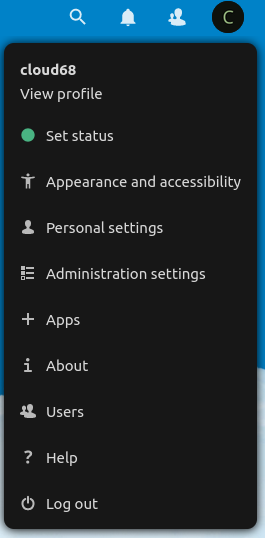
3. Click apps
4. Search for the app you need by clicking the loop icon or by pressing CTRL+F on the keyboard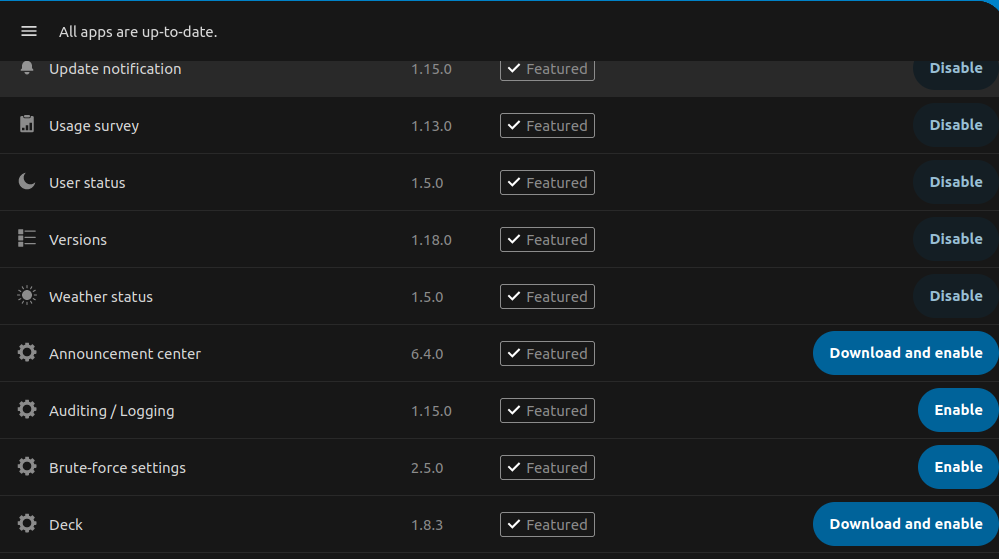
5. Click install and enable
Generally speaking you should be able to install any app, some apps are marked as untested. We suggest for you to not install them, but if you really need it, please open a support ticket, so we can test it for you. We propose this because some untested apps can make your instance inaccessible, thus you are unable to remove the conflicting app.
Nextcloud data encryption
While we of course can't (and don't want to) prevent you from enabling, we would like to caution you to take into consideration the following:
Server Side Encryption provides protection for data on 'external storage' (using external storage app) as the files are encrypted before being uploaded to external storage, and the keys never leave the Nextcloud server. When external storage is not used and a server-wide key is used (which is often the case in our configurations), server side encryption would only cause additional overhead, not just in terms of performance, but also size, as encryption adds more data to files and therefore makes them bigger. In addition, we've also observed some pretty nasty cases of the encryption feature breaking down, and it usually isn't that pretty because in one of our experiences, it has caused a week of downtime. So, unless you're using external storage for Nextcloud, we'd recommend leaving it off.
If what you're looking for is more towards end-to-end encryption (meaning files are encrypted before even being uploaded to Nextcloud), while there is https://apps.nextcloud.com/apps/end_to_end_encryption, its reviews are ... not positive. Some of our subscribers have had success using https://cryptomator.org/ though!
Nextcloud + OnlyOffice
OnlyOffice, stylized as ONLYOFFICE, is a free software office suite developed by Ascensio System SIA, a company headquartered in Riga, Latvia. It features online document editors, platform for document management, corporate communication, mail and project management tools.
Website: https://www.onlyoffice.com.
Nextcloud and OnlyOffice packages
With every Nextcloud Medium+ package you recieve also access to our OnlyOffice deployment: https://cloud68.co/instances/nextcloud#pricing.
Limitations with OnlyOffice
ONLYOFFICE officially offers different versions of its online document editors packaged as ONLYOFFICE Document Server: Community, Enterprise and Developer editions. Since, the Enterprise editions are proprietary offers, we only offer OnlyOffice Community edition.
To review the details of the limitations of the OnlyOffice community edition please visit: https://www.onlyoffice.com/en/compare-editions.aspx
Mobile editing limitations
Currently, it is not possible to edit documents on mobile if your instance is using OnlyOffice.
Mobile editing was possible on previous releases of OO, but it was removed and after a community backlash it was added just to be removed again and to be released as a paid feature. You can read more on this thread https://github.com/ONLYOFFICE/DocumentServer/issues/805
If your team was previously editing on desktop and now is moving more to editing on mobile devices. We would suggest opening a support ticket and request for your instance to connected to our Collabora server.
If you really need to edit on mobile on OnlyOffice, you can check their prices here https://www.onlyoffice.com/workspace-prices.aspx#workspace-on-premises
Nextcloud + Collabora Online
Collabora Online is an open source online office suite that can be integrated into any web application, it is developed by Collabora Productivity, a division of Collabora. Collabora Online has LibreOffice at its core, it allows collaborative real-time editing of word processing documents, spreadsheets, presentations, and vector graphics.
It is a powerful online office suite that supports all major document, spreadsheet and presentation file formats, which you can integrate in your own infrastructure. Key features are collaborative editing and excellent office file format support.
Nextcloud and Collabora Online
Nextcloud Starter packages offered from our team include Collabora Online.
Limitations with Collabora Online
Our Collabora Online deployment as part of the Nextcloud Starter packages has a limitation of up to 10 documents, and 20 connections - to avoid the impression that it is suitable for deployment in large enterprises. For more info about this and user comments, visit: https://help.nextcloud.com/t/collabora-document-limitation-by-purpose-10docs-20connections/4425
Nextcloud Talk
By default, Nextcloud Talk uses Nextcloud's STUN server to establish peer-to-peer connections, as detailed in the official Nextcloud Talk documentation. The TURN server functions as a fallback solution and, based on our experience with Nextcloud Talk, is typically not required for most use cases. However, since internet service providers (ISPs) vary in their infrastructure configurations, we cannot guarantee that all meeting participants will be able to use Talk without potential connectivity issues.
Available Solutions
TURN Server Integration
We maintain a TURN server primarily for BigBlueButton that can be quickly configured for Nextcloud Talk if needed. This integration can be implemented upon request.
Participant Limits
- 5-10 participants: Should work well with the default configuration;
- More than 10 participants: Nextcloud recommends using their High Performance Backend (HPB), which requires a paid license.
Recommendations
Testing Approach
We recommend initially testing Nextcloud Talk without a TURN server configuration. Please notify us if any users experience connectivity issues. In our experience, performance may decline with groups larger than 4-5 participants without additional infrastructure.
Licensing Considerations
The HPB license from Nextcloud supports ongoing development of the platform, which makes business sense for Nextcloud as a company. However, this licensing model may not be ideal for smaller teams.
Alternative Solution Stack
For teams requiring robust communication tools, we often recommend our integrated solution stack:
- Nextcloud - File sharing and collaboration;
- Mattermost - Team chat and messaging;
- BigBlueButton - Video conferencing and webinars.
This combination provides solid communication capabilities while working around the limitations of individual solutions.
Common issues
Below are some of the most common issues some of our subscribers have reported. We will update this page with more such issues as reported from our Subscribers at support.cloud68.co, our support portal.
1. too many failed login attempts to Nextcloud
As every other modern platform, Nextcloud is also built with security in mind. One security element is brute-force protection. When you fail to log in multiple times in a short period of time, then the brute-force protection is triggered, and you will a message similar to it below.
To unlock your account, you will need to open a support ticket by emailing to support@cloud68.co and provide your public IP address. In case you don't know your public IP address, you can search on one of your favorite search engine for "my IP address".
If you wish to learn more about brute-force attacks, you can check out this Wikipedia article, https://en.wikipedia.org/wiki/Brute-force_attack.
2. enter password prompt when using SSO
As a protective measure, Nextcloud will prompt admin to enter their password when they e.x install a new app and haven't logged in in a while. An issue arises on Nextcloud instances that are using SSO (SingleSignOn). Since the authentication is handled by the SSO users on Nextcloud do not "really" have a password instead they have an authentication token. This means that you can't enter your SSO password on the prompt and have it confirmed.
To solve this issue two possible workarounds exist.
- Open a new support ticket, and we will handle the operation for you. (The admin account we have is created from the CLI so is not part of SSO)
- Log out of your instance and log back in again.
Note: at Cloud68.co we do NOT develop this software and all the names and trademarks of the software are owned by the entity behind the project.
Common issues
Below are some of the most common issues some of our subscribers have reported. We will update this page with more such issues as reported from our Subscribers at support.cloud68.co, our support portal.
1. too many failed login attempts to Nextcloud
As every other modern platform, Nextcloud is also built with security in mind. One security element is brute-force protection. When you fail to log in multiple times in a short period of time, then the brute-force protection is triggered, and you will a message similar to it below.
To unlock your account, you will need to open a support ticket by emailing to support@cloud68.co and provide your public IP address. In case you don't know your public IP address, you can search on one of your favorite search engine for "my IP address".
If you wish to learn more about brute-force attacks, you can check out this Wikipedia article, https://en.wikipedia.org/wiki/Brute-force_attack.
2. enter password prompt when using SSO
As a protective measure, Nextcloud will prompt admin to enter their password when they e.x install a new app and haven't logged in in a while. An issue arises on Nextcloud instances that are using SSO (SingleSignOn). Since the authentication is handled by the SSO users on Nextcloud do not "really" have a password instead they have an authentication token. This means that you can't enter your SSO password on the prompt and have it confirmed.
To solve this issue two possible workarounds exist.
- Open a new support ticket, and we will handle the operation for you. (The admin account we have is created from the CLI so is not part of SSO)
- Log out of your instance and log back in again.
Installing Nextcloud apps
What are Nextcloud apps?
Nextcloud apps from their name are "mini applications" that extend the functionality of Nextcloud. Nextcloud has a set of core application which come installed by default when Nextcloud is installed, but it also has hundreds of other applications developed by the community to add features and integration. The applications can be found https://your-nextloud-url/settings/apps/discover
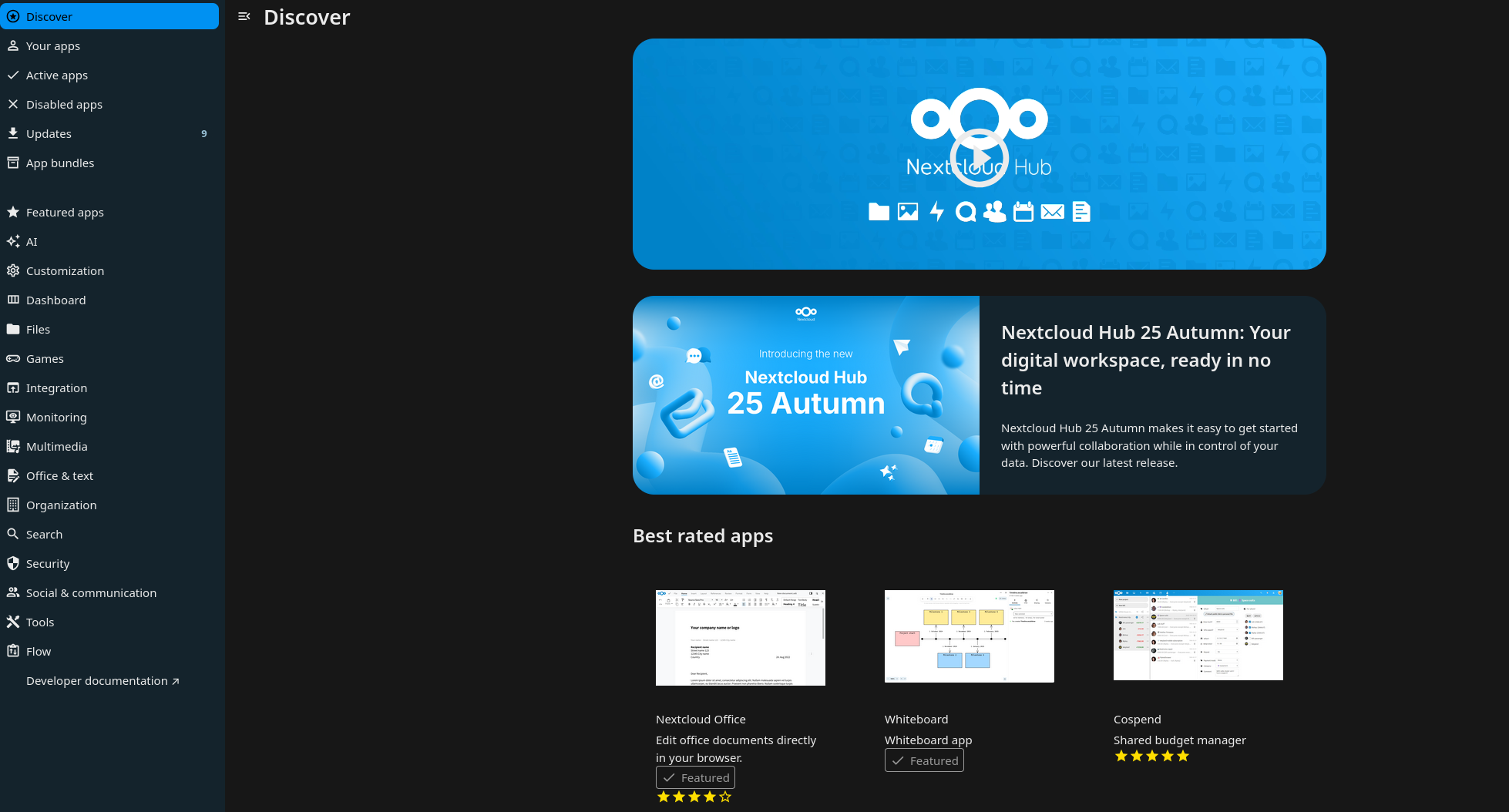
How can I install an app?
To install an app, your account will need to have admin permissions. If you don't have admin permissions, you can ask your it admin or your colleague that is in contact with us to install the app you need.
If you have an admin account, you can install the app by following the steps below:
1. Login into your account
2. Click your profile on the top right corner
3. Click apps
4. Search for the app you need by clicking the loop icon or by pressing CTRL+F on the keyboard
5. Click install and enable
Generally speaking you should be able to install any app, some apps are marked as untested. We suggest for you to not install them, but if you really need it, please open a support ticket, so we can test it for you. We propose this because some untested apps can make your instance inaccessible, thus you are unable to remove the conflicting app.
Nextcloud + OnlyOffice
OnlyOffice, stylized as ONLYOFFICE, is a free software office suite developed by Ascensio System SIA, a company headquartered in Riga, Latvia. It features online document editors, platform for document management, corporate communication, mail and project management tools.
Website: https://www.onlyoffice.com.
Nextcloud and OnlyOffice packages
With every Nextcloud Medium+ package you receive also access to our OnlyOffice deployment: https://cloud68.co/instances/nextcloud#pricing.
Limitations with OnlyOffice
ONLYOFFICE officially offers different versions of its online document editors packaged as ONLYOFFICE Document Server: Community, Enterprise and Developer editions. Since, the Enterprise editions are proprietary offers, we only offer OnlyOffice Community edition.
To review the details of the limitations of the OnlyOffice community edition please visit: https://www.onlyoffice.com/en/compare-editions.aspx
Mobile editing limitations
Currently, it is not possible to edit documents on mobile if your instance is using OnlyOffice.
Mobile editing was possible on previous releases of OO, but it was removed and after a community backlash it was added just to be removed again and to be released as a paid feature. You can read more on this thread https://github.com/ONLYOFFICE/DocumentServer/issues/805
If your team was previously editing on desktop and now is moving more to editing on mobile devices. We would suggest opening a support ticket and request for your instance to connected to our Collabora server.
If you really need to edit on mobile on OnlyOffice, you can check their prices here https://www.onlyoffice.com/workspace-prices.aspx#workspace-on-premises
Nextcloud + Collabora Online
Collabora Online is an open source online office suite that can be integrated into any web application, it is developed by Collabora Productivity, a division of Collabora. Collabora Online has LibreOffice at its core, it allows collaborative real-time editing of word processing documents, spreadsheets, presentations, and vector graphics.
It is a powerful online office suite that supports all major document, spreadsheet and presentation file formats, which you can integrate in your own infrastructure. Key features are collaborative editing and excellent office file format support.
Nextcloud and Collabora Online
Nextcloud Starter packages offered from our team include Collabora Online.
Limitations with Collabora Online
Our Collabora Online deployment as part of the Nextcloud Starter packages has a limitation of up to 10 documents, and 20 connections - to avoid the impression that it is suitable for deployment in large enterprises. For more info about this and user comments, visit: https://help.nextcloud.com/t/collabora-document-limitation-by-purpose-10docs-20connections/4425
Nextcloud Talk
By default, Nextcloud Talk uses Nextcloud's STUN server to establish peer-to-peer connections, as detailed in the official Nextcloud Talk documentation. The TURN server functions as a fallback solution and, based on our experience with Nextcloud Talk, is typically not required for most use cases. However, since internet service providers (ISPs) vary in their infrastructure configurations, we cannot guarantee that all meeting participants will be able to use Talk without potential connectivity issues.
Available Solutions
TURN Server Integration
We maintain a TURN server primarily for BigBlueButton that can be quickly configured for Nextcloud Talk if needed. This integration can be implemented upon request.
Participant Limits
- 2 - 5 participants: Should work well with the default configuration;
- More than 10 participants: Nextcloud recommends using their High Performance Backend (HPB), which requires a paid license.
Recommendations
Testing Approach
We recommend initially testing Nextcloud Talk without a TURN server configuration. Please notify us if any users experience connectivity issues. In our experience, performance may decline with groups larger than 4-5 participants without additional infrastructure.
Licensing Considerations
The HPB license from Nextcloud supports ongoing development of the platform, which makes business sense for Nextcloud as a company. However, this licensing model may not be ideal for smaller teams.
Alternative Solution Stack
For teams requiring robust communication tools, we often recommend our integrated solution stack:
- Nextcloud - File sharing and collaboration;
- Mattermost - Team chat and messaging;
- BigBlueButton - Video conferencing and webinars.
This combination provides solid communication capabilities while working around the limitations of individual solutions.
Nextcloud data encryption with Server Side Encryption
While we of course can't (and don't want to) prevent you from enabling, we would like to caution you to take into consideration the following:
Server Side Encryption provides protection for data on 'external storage' (using external storage app) as the files are encrypted before being uploaded to external storage, and the keys never leave the Nextcloud server. When external storage is not used and a server-wide key is used (which is often the case in our configurations), server side encryption would only cause additional overhead, not just in terms of performance, but also size, as encryption adds more data to files and therefore makes them bigger. In addition, we've also observed some pretty nasty cases of the encryption feature breaking down, and it usually isn't that pretty because in one of our experiences, it has caused a week of downtime. So, unless you're using external storage for Nextcloud, we'd recommend leaving it off.
If what you're looking for is more towards end-to-end encryption (meaning files are encrypted before even being uploaded to Nextcloud), while there is https://apps.nextcloud.com/apps/end_to_end_encryption, its reviews are ... not positive. Some of our subscribers have had success using https://cryptomator.org/ though!
Documentation how to enable E2EE: https://docs.cloud68.co/books/open-source-software-instances-faqs/page/nextcloud-data-encryption-with-e2ee
Documentation how to enable Cryptomator: https://docs.cloud68.co/books/open-source-software-instances-faqs/page/nextcloud-data-encryption-with-cryptomator
Nextcloud data encryption with Cryptomator
Cryptomator allows you to store encrypted vaults inside your Nextcloud, so you are basically using Nextcloud as remote storage. The data is encrypted locally and only decrypted locally through the Cryptomator app.
It works well and is easy to set up, but by using it, Nextcloud becomes just a remote drive. You lose all collaboration, no file sharing, no co-editing, nothing that depends on the Web UI.
This tutorial will show you step by step how to create a Cryptomator vault on Nextcloud.
Before starting with Cryptomator you have to add your Nextcloud account your Nextcloud Desktop client and set up the local folder where the data will be stored. Example below:
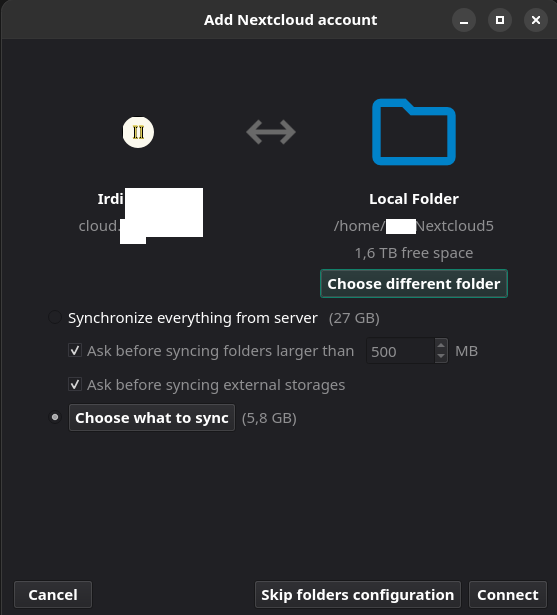
By clicking the folder icon in the top right corner of the client you will go inside the folder where the data is stored.

Create a folder and name it Cryptomator. In matter of seconds you will see the folder appear on Nextcloud.

Now that we have prepare Nextcloud, we continue with the Cryptomator steps.
Download and install Cryptomator. https://cryptomator.org/for-individuals/
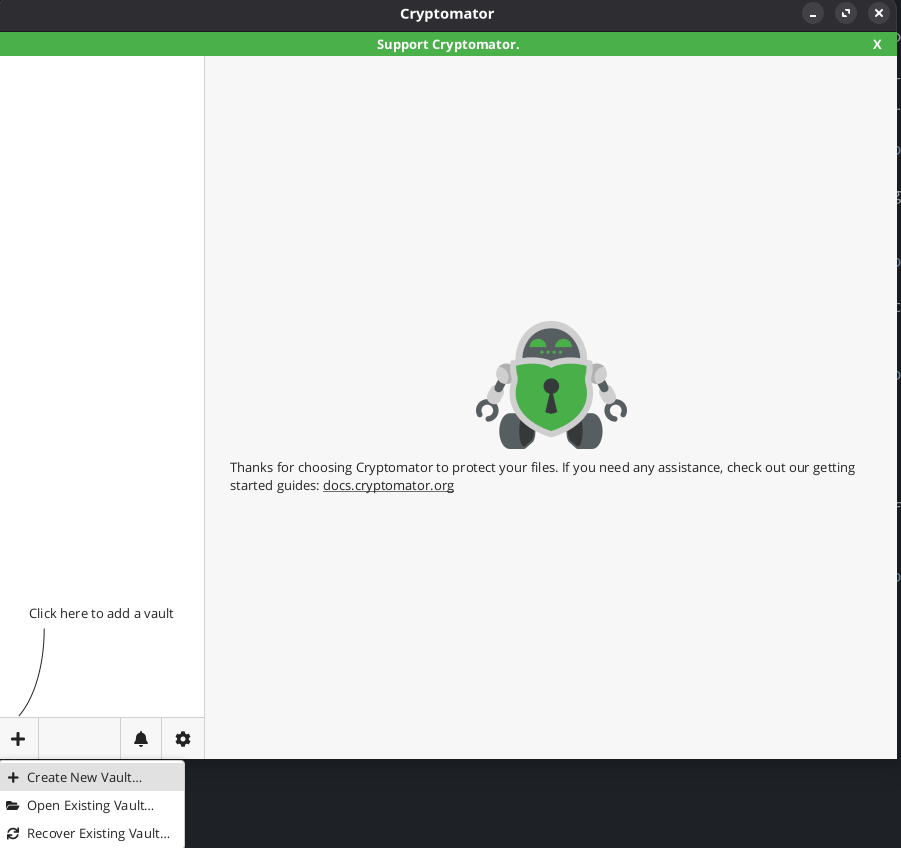
After installing Cryptomator, open it and click the + sign in the bottom left corner to add a vault and click Create New Vault.
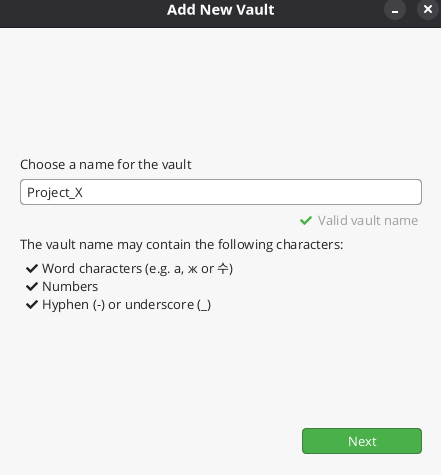
Choose a name for the Vault.
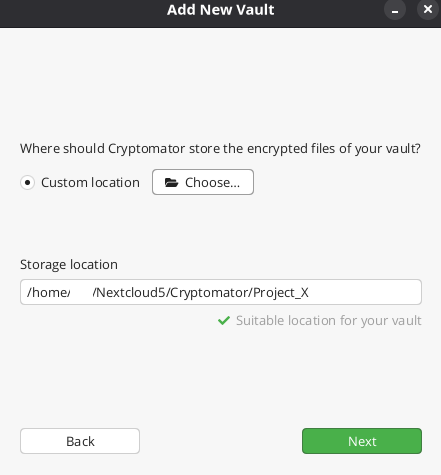
Next click Choose custom location and Choose the Cryptomator folder you created earlier.
Next step is to create a strong password. Do not forget to Yes on the recovery key because without it, if you lose your password you lose access to your data.
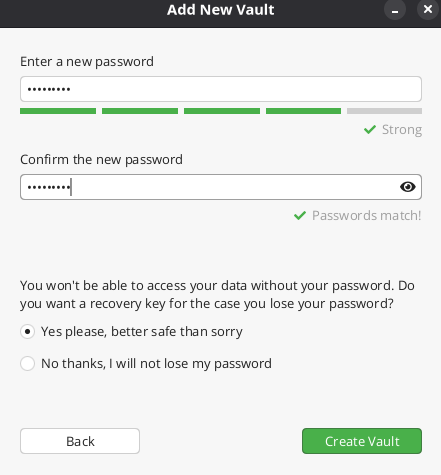
After setting up your strong password, click Create Vault.
Make sure to write down and save the recovery key.
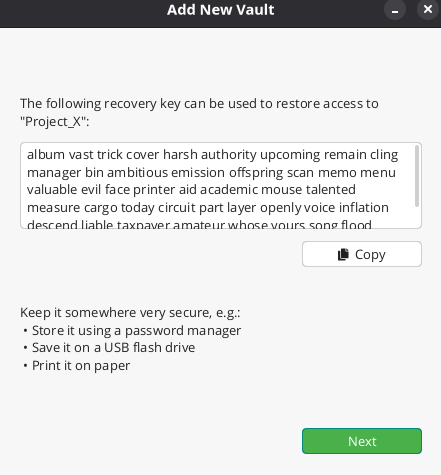
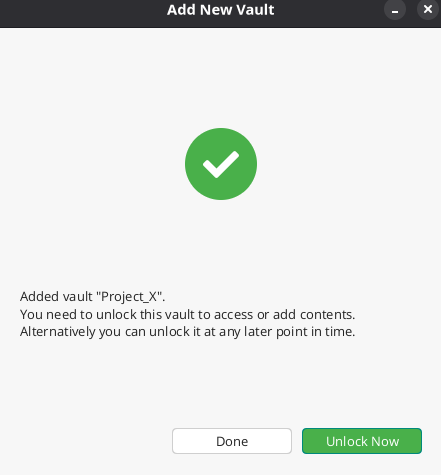
Once you save the recovery key, click unlock now.
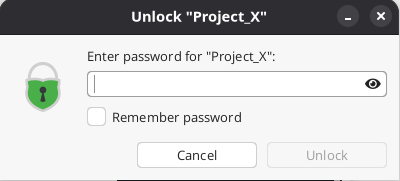
And you will be asked to use your password.
Once the vault is unlocked you will see green button, Reveal Drive. When clicked it opens the folder that you will use to upload the data. Data uploaded there is synced to Nextcloud.
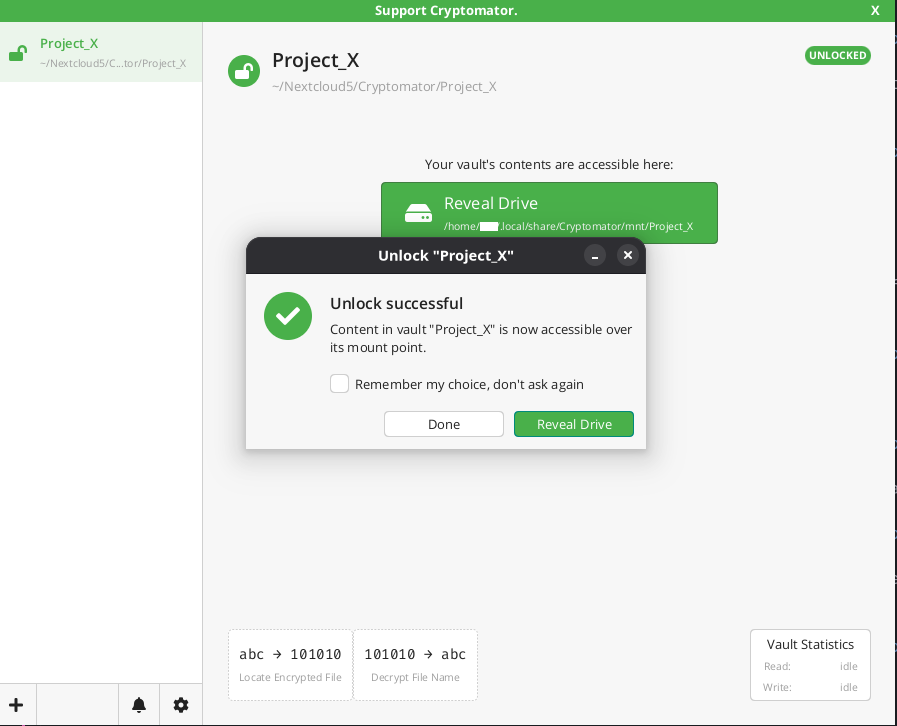
When clicked it opens the folder that you will use to upload the data. Data uploaded there is synced to Nextcloud.

Below you can see how the Test document upload on the local folder above looks on Nextcloud upon encryption.
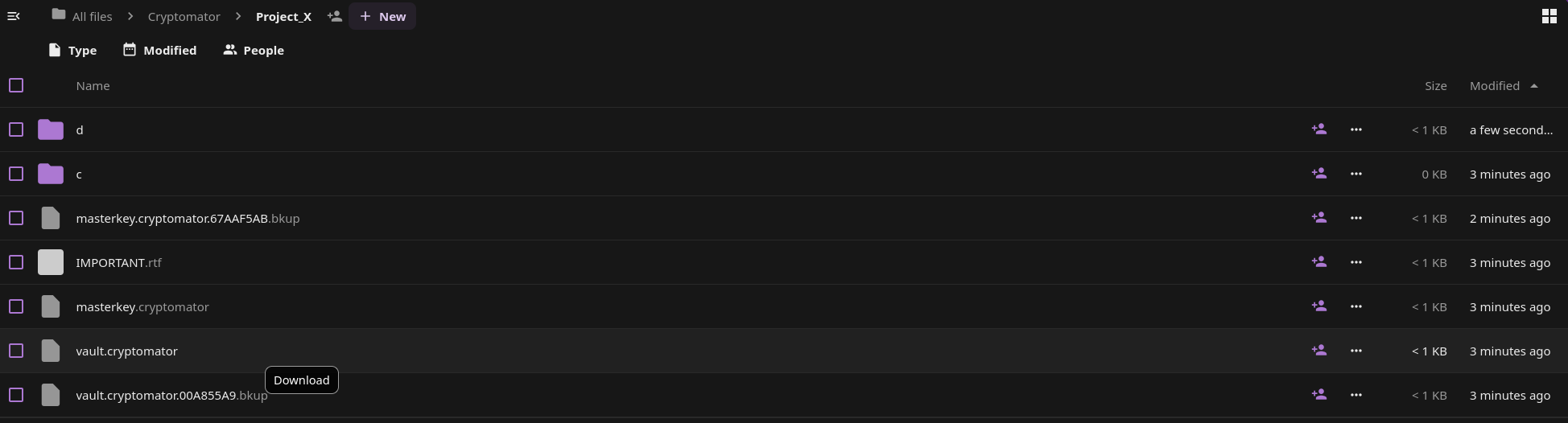
Cryptomator uploads encrypted data to Nextcloud and you can decrypt them locally to see and use.
Two important things to keep in mind:
1 - Write down or save in a password manager the mnemonic because without it, you lose access to your data.
2 - Make sure to have a full backup of the data before encrypting them so if something goes wrong you have a copy to roll back to.
How to create a Nextcloud App Password
When using Nextcloud with Keycloak, Nextcloud does not have a password which sometimes causes issues when configuring the Nextcloud Desktop app or CalDav. In order to bypass this Nextcloud has introduced App Passwords. This gives the possibility to generate a dedicated password for configuring the Nextcloud Desktop app or any third party apps.
How to create an App Password
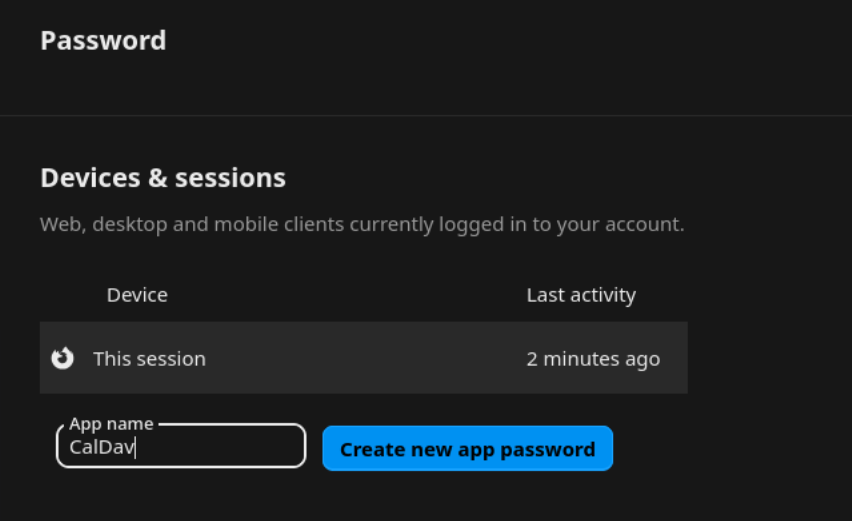
To generate an App Password you have to go under User Settings https://your.nextcloud/settings/user/security (replace your.nextcloud/ with your domain). Write a name under App name and click Create new app password. Use that password to configure the Nextcloud Desktop app or CalDav on your devices.
How to add a New User to Nextcloud
To create a new user in Nextcloud follow the steps below.
Go to Account by clicking on your profile icon on top right corner of your Nextcloud.
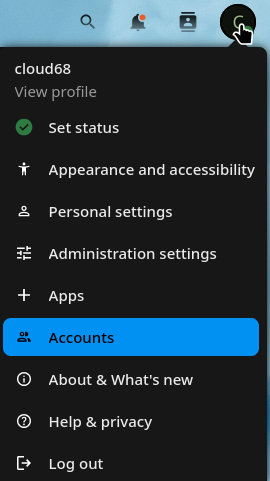
Click New Account.

-
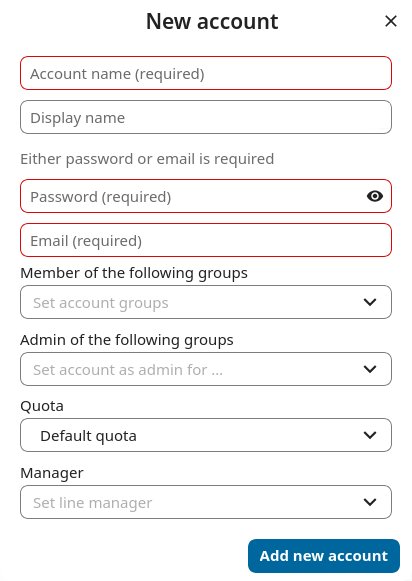
Enter the new user’s Login Name and their Email.
- Leave password empty so users can recieve an email to set up their own password.
-
Optionally, assign Groups memberships
-
Click the Add new account button
Nextcloud Encryption with E2EE
After you request E2EE encryption, and we enable it, you can check it under your Personal Settings - Security. It will look like the pic below.
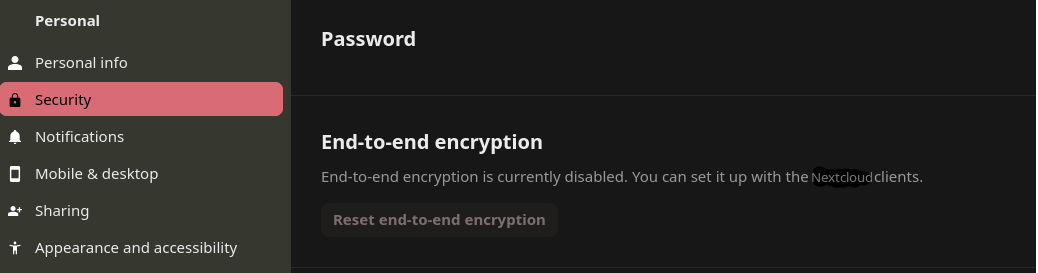
In order to activate the E2EE encryption you will have to restart your Nextcloud Desktop Client.
Once the Nextcloud client is restarted you will see "Set up encryption" as seen in the screenshot below
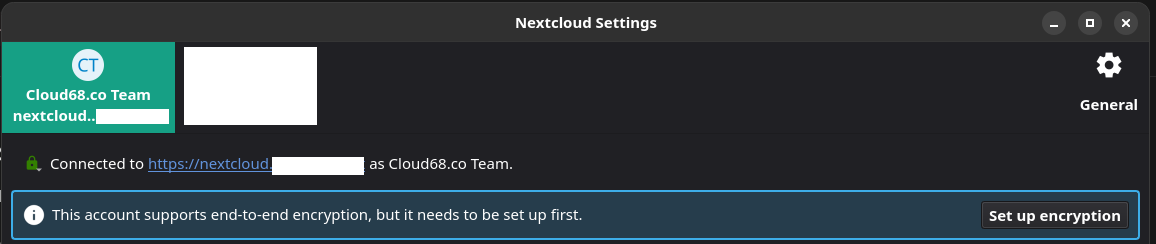
Upon clicking "Set up encryption" it will create an End-to-End encryption mnemonic which you need to save in password manager or write it down. If you lose this you lose access to the encrypted data.
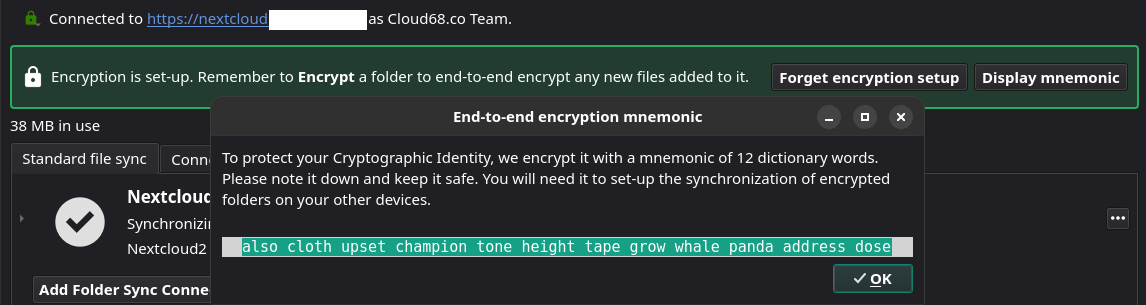
Now that E2EE is set up you can test by creating an empty folder on Nextcloud and on the Nextcloud Desktop client, if you right-click the folder you will see an option "Encrypt". Only empty folders can be encrypted, and after the encryption you can start uploading data from your computer to the encrypted folder.

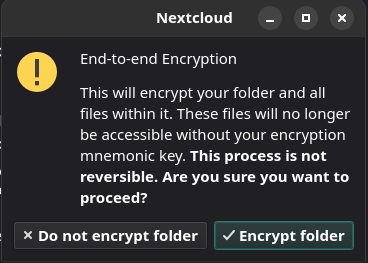
The encrypted folders look like this.

And on Nextcloud it looks like this. Keep in mind that you can not see any content inside the folder on Nextcloud. You can see the data only on your Desktop client, upon decryption.

Two important things to keep in mind:
1 - Write down or save in a password manager the mnemonic because without it, you lose access to your data.
2 - Make sure to have a full backup of the data before encrypting them so if something goes wrong you have a copy to roll back to.
Nextcloud Mail - How to archive an email
In order to move emails to Archive we first need to create a folder named Archive by going to Settings and clicking "Add a folder"
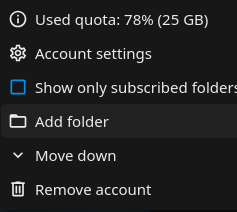
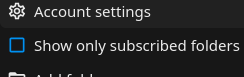
Nextcloud mail app supports quick actions in order to make process faster. In order to set up an action you have to click on the three dots next to your email and click Account Settings
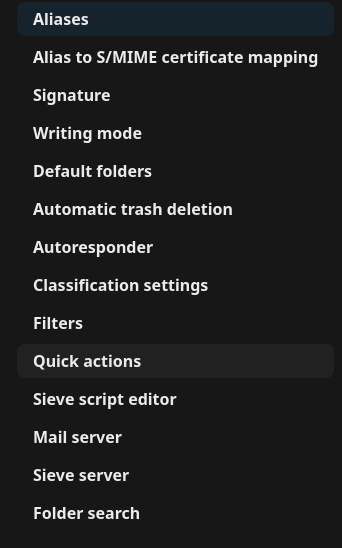
Click Quick Actions:
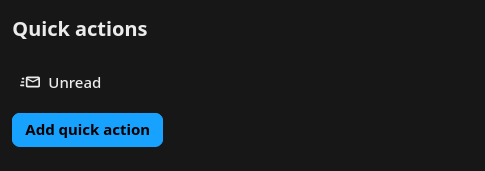
Click Add quick action:
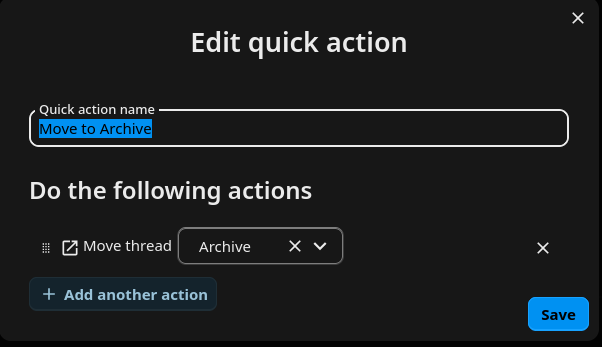
Choose a name for the quick action, example Move to Archive. Add actions by clicking "+ Add another action". Click "Move thread" and select the folder "Archive" and click Save.
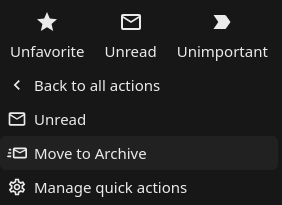
Now if you click on the three dots next to an email and then Quick Actions you can move the email to Archive just be clicking "Move to Archive"
Enjoy Nextcloud Mail!
Nextcloud Mail - Unread mails
Within Nextcloud Mail app the only way to check Unread mail is by clicking the Search bar and clicking the button Unread.

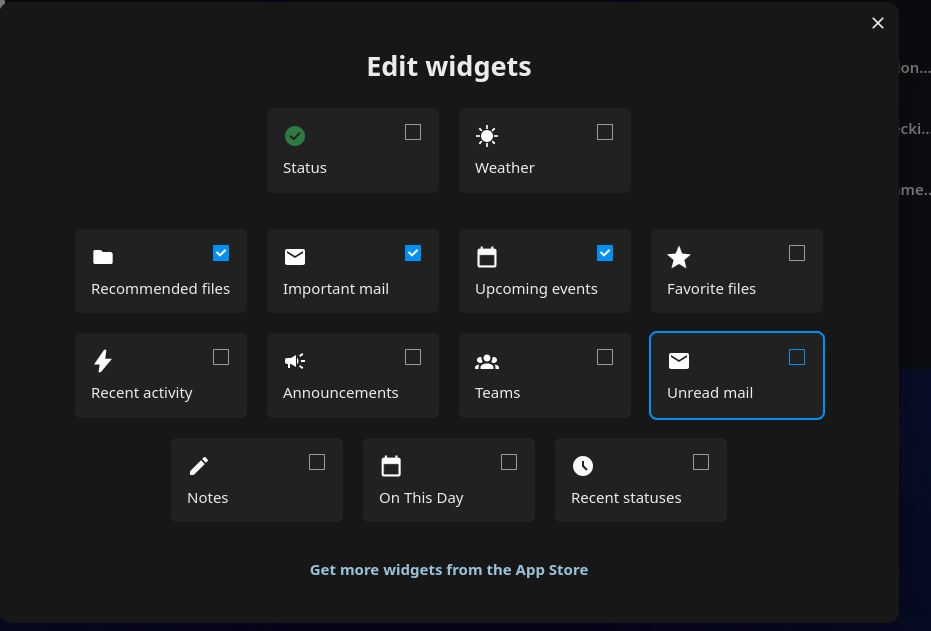
There is also a widget which can be added on the Dashboard that filters the Unread mail. You can click Customize on your Dashboard and add it on your Dashboard for easy access.
Nextcloud Calendar and Contacts on mobile devices
Before we continue with different systems, Android and iOS and different ways to configure Nextcloud Calendar and Contacts, create an App Password which will be needed in later steps. To create an App Password follow this guide https://docs.cloud68.co/books/open-source-software-instances-faqs/page/how-to-create-a-nextcloud-app-passwor
Setting up Nextcloud Calendar and Contacts on Android devices
Follow up the detailed and very helpful guide that Nextcloud provides.
https://docs.nextcloud.com/server/21/user_manual/en/pim/sync_android.html
Backup link here.
At the step where it asks for the password, use the App Password you created earlier.
Setting up Nextcloud Calendar and Contacts on iOS devices
Follow the detailed and very helpful guide that Nextcloud provides.
https://docs.nextcloud.com/server/21/user_manual/en/pim/sync_ios.html
Backup link here.
At the step where it asks for the password, use the App Password you created earlier.
If you need support, you can reach us using our support channels.
Installing and configuring LibreSign
To install LibreSign on Nextcloud go to Apps and install LibreSign by clicking Download and enable.

After installing the app go under Administration Settings
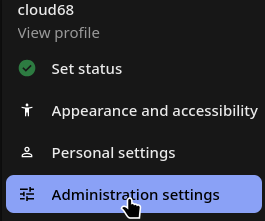
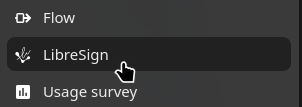
Go to the LibreSign option on the right panel
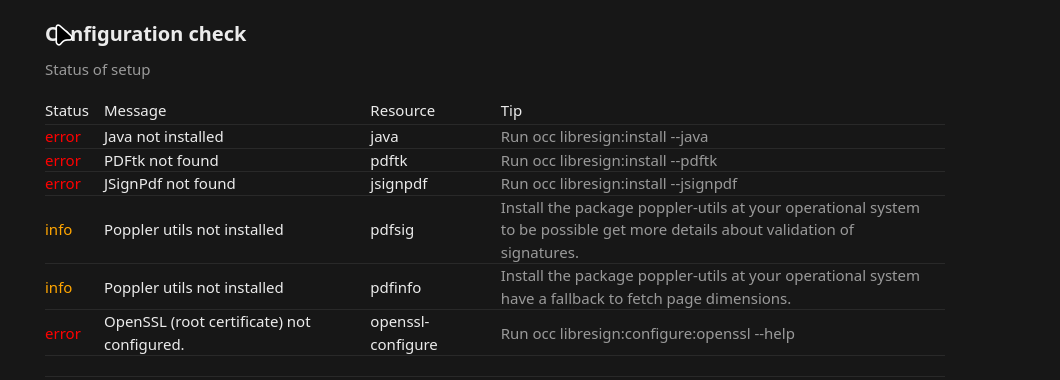
Under configuration check there is a list of OCC commands which needs to be run on the server. Go to the Nextcloud directory and run the commands.
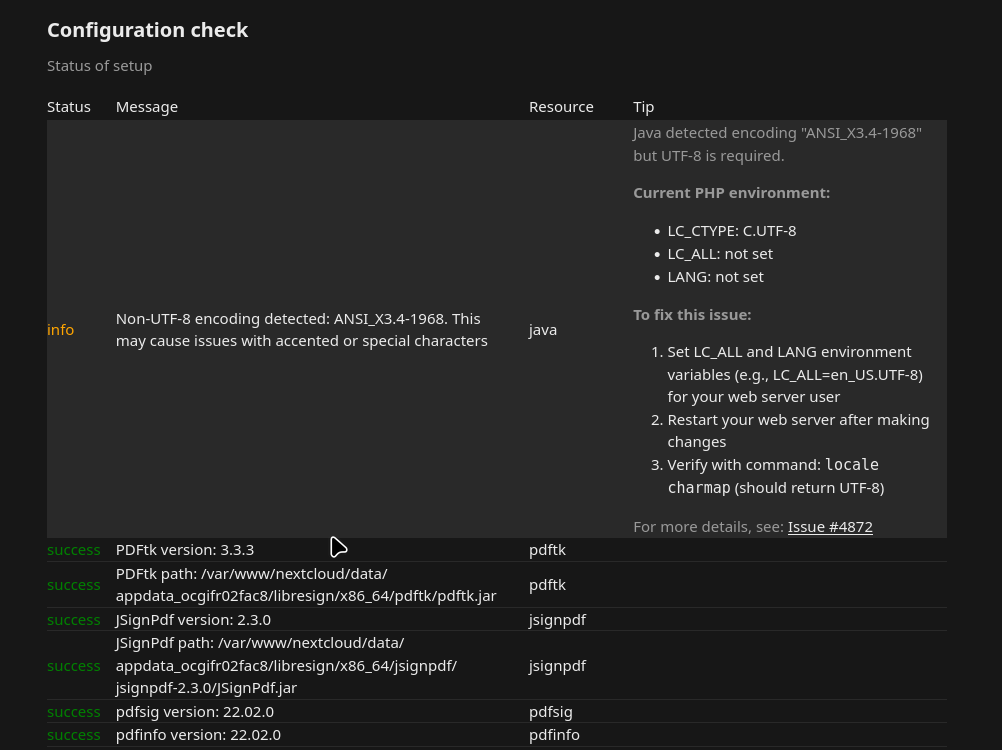
After running all OCC commands it will look like this
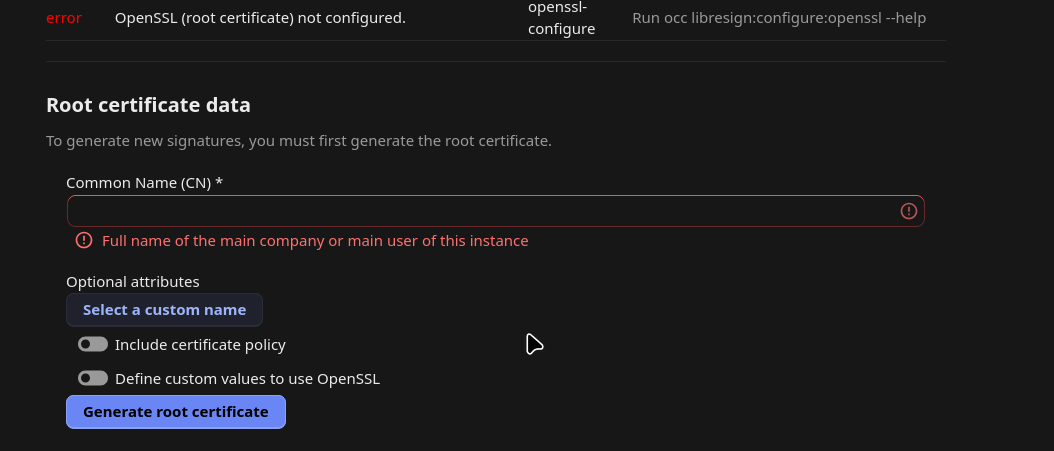
Next step is to configure a root certificate using either company name or if it is a single user instance the users name.
Under identification choose Click to Sign
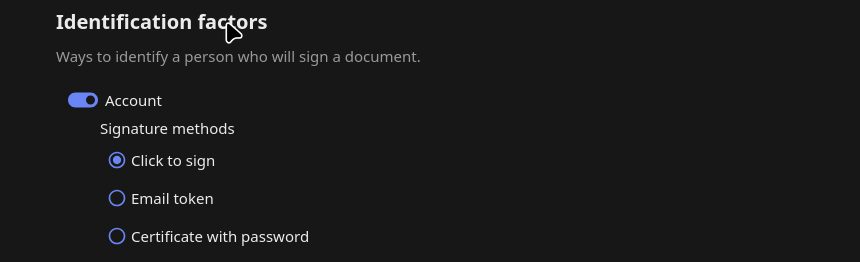
That's it!
Nextcloud retention and tagging
Retention
Nextcloud includes a retention feature that allows files to be automatically deleted after a defined period of time. This is done by applying a collaborative tag to files and configuring a rule that removes those tagged files once they reach a certain age. This is possible by using the application “Retention”.

For example, you can define a rule where any file tagged as “Temporary” is automatically deleted 14 days after its creation. There is also an option to notify the file owner one day before deletion, so they have time to review or retain the file if needed.
Retention rules can be based on two types of file age:
- Creation date (when the file was uploaded or created in Nextcloud)
- Last modification date (when the file was last changed)
It is important to note that retention tags should be configured as restricted or invisible. If tags are publicly editable, users may remove them, which would prevent the retention rule from being applied.
Full documentation about Retention can be found here: https://docs.nextcloud.com/server/stable/admin_manual/file_workflows/retention.html
Tagging
To make this process reliable, automatic tagging can be used. This ensures that files are tagged as soon as they are uploaded, without relying on users to manually apply tags. These tags can then be used by retention rules to enforce cleanup policies consistently. This is made possible via the app “Files automated tagging”

Documentation regarding automatic tagging can be found here: “https://docs.nextcloud.com/server/stable/admin_manual/file_workflows/automated_tagging.html”
Nextcloud Mail search
Nextcloud Mail App has two search options. The first one appears at the top of the inbox but is not very powerful.

By clicking the three lines on the right corner of the "Search in folder" bar, advanced search pops up which is much more powerful.
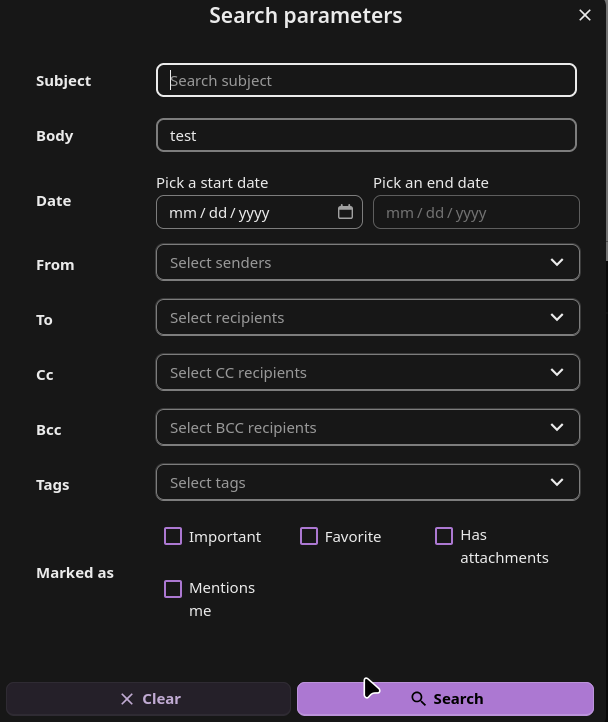
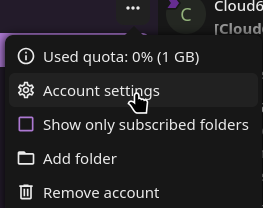
To make search even more powerful, go to Account settings by clicking the three dots next to your email address
Scroll down to the bottom and enable Mail body search.
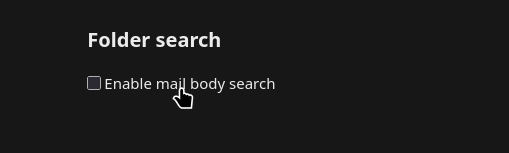
Enjoy your improved search in Nextcloud Mail!
Nextcloud Mail Signature
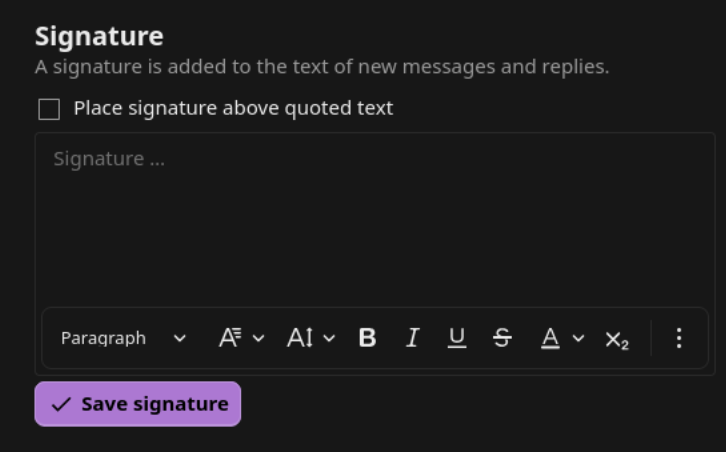
On Nextcloud Mail app you can add your signature by going to Account Settings.
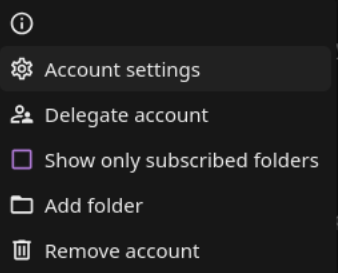
Under the tab Signature
Our templated proposal to be used as a Signature while migrating below:
[First Name] [Last Name]
[Job Title]
[email address]
[Optional: office hours / days closed note]
[Organization Name] is migrating off Google! During this transition, it's possible that we may miss some emails or calendar invitations. Please don't hesitate to reach out again if I'm slow to respond. Thank you for your patience as we adjust to our new systems!
Vaultwarden
Vaultwarden is an open source password manager and an alternative implementation of the Bitwarden server API written in Rust and compatible with upstream Bitwarden clients*. It is perfect for self-hosted deployment where running the official resource-heavy service might not be ideal.
More info about the project can be found here, https://github.com/dani-garcia/vaultwarden.
Note: at Cloud68.co we do NOT develop this software and all the names and trademarks of the software are owned by the entity behind the project.
Software update frequency
For information about the way we handle software updates, please visit https://docs.cloud68.co/books/faqs-tech-support/page/scheduled-maintenance-software-updates.
How to invite a new user to Vaultwarden
To invite a new user to your Vaultwarden organization, you will need to follow the steps below:
1. Login to your Vaultwarden instance (if you are not logged in already)
2. Navigate to your organization
3. Click Manage and then click invite user
4. Enter the user email address, type of user and the level of access.
5. Click save
This will send an email invitation which is valid for 5 days.
The new user you added needs to follow the steps below in order to create their account.
1. Login to your email account.
2. Open the email from Vaultwarden inviting you to join the organization.
3. Click the link on the email and click create new account
4. Enter your details (please be careful to remember the master password because this password can not be reset)
5. Click continue
6. Now you will get an email into your mailbox to verify. Click the link on the email.
7. Now login with your email and your master password.
After the new user has created their account, the organization owner needs to confirm the newly added user. To do this, you can follow the steps below:
1. Login into your account
2. Navigate to your organization
3. Click manage
4. Select the newly added use and click confirm
Setting up Vaultwarden on your mobile device
- Download the Bitwarden app from App Store or Play store


The steps below are the same for both platforms
- On the login screen, click the gear icon
- Type the URL of your instance.
- Click save
- Type your email and your master password
- Click login
Setting up Vaultwarden on your desktop
1. Download the desktop app for your platform:


The steps below are the similar for all desktop platforms
2. Double-click on the downloaded app and follow the instructions to install it
3. Open Bitwarden app and on the bottom click Accessing: and select self-hosted
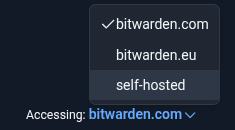
4. Input your organization Vaultwarden instance URL (e.x passwords.example.org)
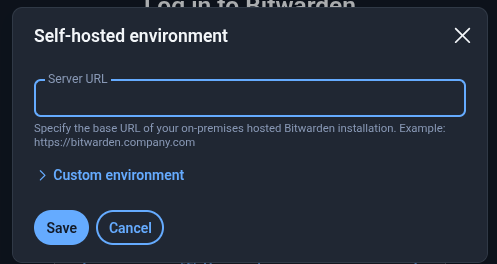
5. Click Save
6. Enter your account details and click continue
Setting up Vaultwarden browser plugin(s)
1. Click on of the links below to get the extension which is compatible with your browser
Chrome: https://chrome.google.com/webstore/detail/bitwarden-free-password-m/nngceckbapebfimnlniiiahkandclblb
Firefox: https://addons.mozilla.org/firefox/addon/bitwarden-password-manager/
Safari: https://itunes.apple.com/app/bitwarden/id1352778147
Brave: https://chrome.google.com/webstore/detail/bitwarden-free-password-m/nngceckbapebfimnlniiiahkandclblb
2. Click add to "your browser name" and then click add extension
3. click the extension icon (on the top right of your screen) and pin it
4. Click on the Bitwarden extension and click the gear icon
5. Enter your organization's Vaultwarden URL (e.x passwords.example.com) and click save.
6. Enter your account details and click continue
How to disable a Vaultwarden account
1 - Go to Vaultwarden admin panel, your-instance-ur/admin/ and access using the admin token which we have shared with you.
2 - Go to the Users tab on the top panel. Locate the user and then Deauthorize sessions and Disable account.
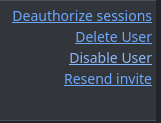
That's it!
BigBlueButton
BigBlueButton is an open-source platform created by a community of dedicated developers passionate about helping improve online learning. It is constantly evolving and improving through a dedicated, growing international user and developer community. To date, there have been more than a dozen releases of the core product, and each new release has seen the development of new features, testing, and documentation as well as improved community support.
Note: at Cloud68.co we do NOT develop this software and all the names and trademarks of the software are owned by the entity behind the project.
Software update frequency
For information about the way we handle software updates, please visit https://docs.cloud68.co/books/faqs-tech-support/page/scheduled-maintenance-software-updates.
Time for the deployment of the instance
Once we receive an instance request form for your preferred package (Starter or Medium+) we require two business days to deploy your instance and give you access to it.
During this time, we will work on allocating resources and configure your instance according to the specs mentioned on the instance page. This timeframe also allows us to thoroughly test your instance to ensure it is fully functional before handing it over to you.
We understand that time is of the essence in today's fast-paced environment. However, we prioritize the quality and reliability of our services to ensure that you receive the best possible experience.
If you have any questions or concerns regarding our cloud deployment process, please do not hesitate to contact our customer support team. We are always available to assist you and address any issues you may have.
Things to keep in mind for the best experience
Below are some things that will make your experience of using BigBlueButton:
- Make sure to use headphones in order to avoid echo.
- When you are joining a call with low speed internet, we advise you to either use a camera with the 'low res' setting', or not using it at all.
- Please mute when you are not speaking.
In case you are a Cloud68.co Subscriber, contact our support team – we are happy to help.
How to Download recorded videos
Once the videos become available (takes some time after you end the meeting), you can download them when visit the links of the rooms and scroll down to the recordings, you'll see a “Video” button.
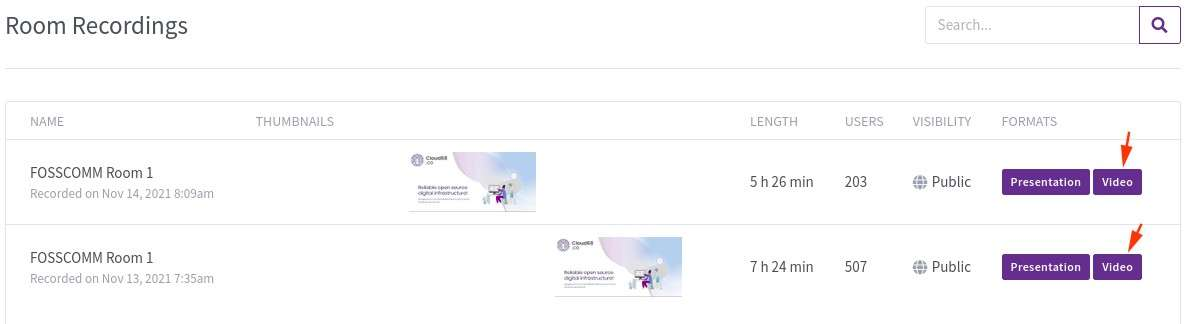
Right-click on the recording screen that will open and click Save Video As.
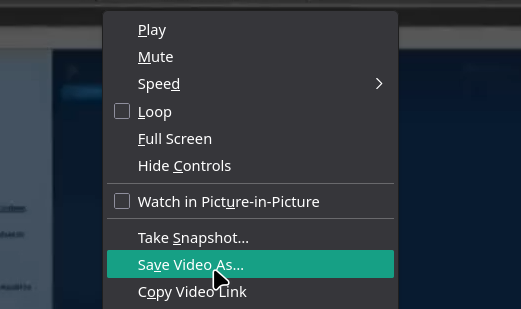
Name the file and choose a download location and wait for it to download.
Known Limitation: Logout with Keycloak SSO
Greenlight v3 does not fully log you out of Keycloak when you log out of Greenlight.
When you sign out of Greenlight, your Keycloak session stays active in the background. If you log in again, you won't be asked for your credentials, you'll be signed in automatically.
The reverse is also true: signing out of Keycloak directly does not log you out of Greenlight.
This happens because Greenlight does not currently support full single logout (SLO) with Keycloak. This is a known, unresolved issue as of April 2025.
Bookstack
BookStack is the ideal platform for your knowledge base and for storing and organizing information and documentation. Details for BookStack can be found on the official website at bookstackapp.com.
It is an opinionated wiki system that provides a pleasant and simple out-of-the-box experience. New users to an instance should find the experience intuitive, and only basic word-processing skills should be required to get involved in creating content on BookStack. The platform provides advanced power features to those that desire it, but they should not interfere with the core simple user experience.
Note: at Cloud68.co we do NOT develop this software and all the names and trademarks of the software are owned by the entity behind the project.
Software update frequency
For information about the way we handle software updates, please visit https://docs.cloud68.co/books/faqs-tech-support/page/scheduled-maintenance-software-updates.
Discourse
Discourse is a free and open-source Internet forum software. Features include support for threading, categorization and tagging of discussions, configurable access control, live updates, expanding link previews, infinite scrolling, and real-time notifications. It allows for a high level of customizability via its plugin architecture and its theming system.
The default homepage features a list of active topics, as well as navigation buttons that help users find discussions they're interested in.
Since its release, Discourse has been undergoing active development, with over 40,000 commits as of March 2022.
Note: at Cloud68.co we do NOT develop this software and all the names and trademarks of the software are owned by the entity behind the project.
Software update frequency
For information about the way we handle software updates, please visit https://docs.cloud68.co/books/faqs-tech-support/page/scheduled-maintenance-software-updates.
Discourse plugins
Unlike some platforms like Nextcloud, Discourse doesn't support installing plugins through the web interface. Plugin installation requires server-level configuration changes.
As part of our managed hosting service, we handle all server-level modifications for you at no additional cost. This includes installing, configuring, updating, and removing plugins.
To request a plugin installation, contact our support team and include:
- The name of the plugin
- A link to the plugin's repository or documentation (if available)
- Any specific configuration requirements
You have platform admin status on your Discourse instance, giving you full control over site settings, user management, themes, and content moderation. For tasks that require server access, like plugin installation, we handle those as part of your service at no additional charge. We consider the inability to install plugins through the web interface to be a limitation of the software itself, not a premium service.
Ghost
Ghost is a free and open-source content management system (CMS) and publishing platform designed specifically for professional publishing. Built on Node.js, Ghost focuses on simplicity, speed, and providing creators with the tools they need to build a membership business around their content.
Ghost features a modern, distraction-free writing interface with Markdown support, built-in SEO optimization, newsletter functionality via email, membership and subscription management, a powerful theming system, and a RESTful API for custom integrations. The platform is designed to be fast, secure, and easy to maintain, making it an excellent choice for bloggers, journalists, and content creators who want full control over their publishing workflow.
Since its launch in 2013, Ghost has grown to power thousands of publications worldwide and continues to receive regular updates and improvements from both the core team and its active community.
Note: at Cloud68.co we do NOT develop this software and all the names and trademarks of the software are owned by the entity behind the project.
Software update frequency
For information about the way we handle software updates, please visit https://docs.cloud68.co/books/faqs-tech-support/page/scheduled-maintenance-software-updates.
Analytics in Ghost
Ghost includes a powerful built-in analytics system that provides comprehensive insights into your content performance, audience engagement, and growth metrics. The platform does this without requiring third-party tools or additional setup.
Native Analytics Features
Ghost's first-party analytics are fully integrated into the platform and offer several key advantages:
- Privacy-focused approach - Ghost analytics doesn't use cookies or any persistent browser storage to track visitors. Instead, it counts unique visitors within 24-hour windows, providing accurate metrics while respecting user privacy.
- Web Traffic Analytics - you can track page views, unique visitors, and real-time readers across all your content. The system shows which posts and pages are performing best, where your traffic is coming from (referral sources, social media, direct visits), and geographic data showing which countries your readers are in.
- Newsletter Performance - Monitor subscriber growth, average open rates, click rates, and engagement across all your email newsletters. Each newsletter shows detailed metrics including which links received the most clicks and how many unique members engaged with your content.
- Audience Growth & Revenue - Track how many new free and paid members sign up through specific posts, measure Monthly Recurring Revenue (MRR) impact, and understand which content drives conversions for your membership organization/business.
- Post-Level Analytics - Every post includes detailed analytics showing web traffic, newsletter performance, and member growth directly attributed to that content. This helps you understand what resonates with your audience.
Official Ghost docs: https://ghost.org/help/native-analytics/
Third-Party Integration Support
While Ghost's native analytics provide comprehensive insights, the platform also supports integration with external analytics tools like Google Analytics :(, Fathom Analytics, Tinybird and others through its code injection feature. This allows publishers to combine Ghost's membership-focused metrics with additional web analytics data if needed. Analytics data is generated based on your publication's configuration. This means that if you don't use paid subscriptions, you won't see revenue metrics, and if you don't send newsletters, email statistics won't appear. This keeps your analytics dashboard focused on the metrics that matter to your specific use case.
We support the Tinybird integration since Ghost has partnered with Tinybird. In order to have it integrated to your Ghost instance you will need to create an account with Tinybird and provide us the information to connect it to your Ghost instance.
Peertube
PeerTube is a free and open-source, decentralized, ActivityPub federated video platform powered by WebTorrent, that uses peer-to-peer technology to reduce load on individual servers when viewing videos.
Started in 2017 by a programmer known as Chocobozzz, development of PeerTube is now supported by the French non-profit Framasoft. The aim is to provide an alternative to centralized platforms such as YouTube, Vimeo, and Dailymotion.
As an ActivityPub platform, it is part of the federated network known as the Fediverse.
Note: at Cloud68.co we do NOT develop this software and all the names and trademarks of the software are owned by the entity behind the project.
Software update frequency
For information about the way we handle software updates, please visit https://docs.cloud68.co/books/faqs-tech-support/page/scheduled-maintenance-software-updates.
Funkwhale
Funkwhale is a community-driven project that lets you listen and share music and audio within a decentralized, open network. It is a free libre open source software alternative to SoundCloud, which can be self-hosted. You can browse your Music by artist, album, genre, playlist, or record label, as well as by direct searches. Funkwhale gives you access to your playlists, favorite tracks, and artists everywhere, from a web interface or the wide range of compatible apps for every platform. Funkwhale music streaming is available on all Android and iOS devices via compatible applications like DSub, and on desktop computers for unlimited duration’s.
Note: at Cloud68.co we do NOT develop this software and all the names and trademarks of the software are owned by the entity behind the project.
Software update frequency
For information about the way we handle software updates, please visit https://docs.cloud68.co/books/faqs-tech-support/page/scheduled-maintenance-software-updates.
Mautic
Mautic is a community-driven project that lets you manage and automate marketing campaigns within a decentralized, open network. It is a free libre open source software alternative to HubSpot or Mailchimp, which can be self-hosted. You can create and track emails, landing pages, forms, social media campaigns, and workflows, as well as manage contacts and lead journeys. Mautic gives you access to your campaigns, analytics, and automation everywhere, from a web interface or the wide range of compatible integrations for every platform. Mautic marketing automation is available on all Android and iOS devices via compatible applications, and on desktop computers for unlimited use.
Note: at Cloud68.co we do NOT develop this software and all the names and trademarks of the software are owned by the entity behind the project.
Software update frequency
For information about the way we handle software updates, please visit https://docs.cloud68.co/books/faqs-tech-support/page/scheduled-maintenance-software-updates.
Common issues
At the moment, we don't have any significant issue reported from our Subscribers using our support.cloud68.co portal.
Mautic + SMTP service
The Simple Mail Transfer Protocol (SMTP) is an Internet standard communication protocol for electronic mail transmission. Mail servers and other message transfer agents use SMTP to send and receive mail messages.
When you use Mautic for marketing automation, it is important to have a qualitative SMTP service that will not be flagging the emails you sent as spam. The integration of an SMTP package is done by our team once you request your instance to make it easier for you to focus on getting more leads and less on technical maintenance of your Mautic instance.
Matomo
Matomo, formerly Piwik, is the free and open source Google Analytics alternative that protects your data and your customers’ privacy. It tracks online visits to one or more websites and displays reports on these visits for analysis. With Matomo, businesses and individuals can rest assured that data is 100% yours and the privacy of your users is respected. The relationship remains between the website owner (you) and the visitor, with no external sources looking in.
Note: at Cloud68.co we do NOT develop this software and all the names and trademarks of the software are owned by the entity behind the project.
Software update frequency
For information about the way we handle software updates, please visit https://docs.cloud68.co/books/faqs-tech-support/page/scheduled-maintenance-software-updates.
GitLab
GitLab is an open source code repository and collaborative software development platform for large DevOps and DevSecOps projects. GitLab offers a location for online code storage and capabilities for issue tracking and CI/CD. The repository enables hosting different development chains and versions, and allows users to inspect previous code and roll back to it in the event of unforeseen problems.
More info about the project can be found here, https://about.gitlab.com/
Note: at Cloud68.co we do NOT develop this software and all the names and trademarks of the software are owned by the entity behind the project.
Software update frequency
For information about the way we handle software updates, please visit https://docs.cloud68.co/books/faqs-tech-support/page/scheduled-maintenance-software-updates.
GitLab handbook
New GitLab user? Here is the GitLab handbook that will help you learn more about the mission and how the company is run: https://about.gitlab.com/handbook/. Also, this might be handy to check before opening a support ticket for your instance.
GitLab Runners
GitLab Runners are software agents that are used to execute continuous integration (CI) and continuous delivery (CD) pipelines in GitLab. They are responsible for running the jobs defined in GitLab's configuration files, which can include tasks such as building and testing code, deploying applications, and running other automated processes.
At Cloud68.co we also provide GitLab runners because they are an essential part of the GitLab CI/CD process. By providing runners as part of our service, we make it easier for you (our Subscriber) to set up and execute you CI/CD pipelines within your GitLab instance.
Additionally, GitLab runners can be configured to run jobs on a variety of platforms, including Linux, Windows, and macOS. By offering you team with runners as part of our GitLab offering, our team ensures that our Subscribers have access to a variety of runner options that can be tailored to your specific needs.
Matrix
Matrix Chat is an open standard for real-time communication. It provides interoperable, decentralized, and secure communication across various platforms. Our hosting service ensures that users can easily utilize Matrix Chat without the technical complexities. By understanding Matrix Chat's features and common issues, our hosting service ensures an optimal and secure communication experience for users across different platforms.
Note: at Cloud68.co we do NOT develop this software and all the names and trademarks of the software are owned by the entity behind the project.
Software update frequency
For information about the way we handle software updates, please visit https://docs.cloud68.co/books/faqs-tech-support/page/scheduled-maintenance-software-updates.
Matrix handbook
For comprehensive user guidance, please refer to the official user guide from Matrix.
Integration with other platforms
Matrix Chat can seamlessly integrate with numerous platforms and services. Our hosting offers integrations with popular tools such as Slack, Telegram, IRC, and more, providing a unified communication experience.
Data encryption
Matrix Chat is committed to user privacy and data security. End-to-end encryption ensures that conversations are kept private and secure. Our managed hosting ensures that the latest encryption methods are employed to maintain the integrity and confidentiality of data.
Common issues
- Connectivity Problems: Sometimes users might experience connection difficulties, often solved by checking the network configuration.
- Integration Failures: Misconfiguration can lead to issues in integrating with other platforms.
- Update Delays: Unexpected delays in software updates might occur; please refer to the software update frequency section for our schedule.
- Encryption Errors: Misconfiguration in encryption settings might cause message delivery failures. Our support team is always available to assist with such concerns.
For more details or assistance with any of these issues, please contact our support team.
WordPress
WordPress is a free and open-source content management system (CMS) written in PHP and paired. Features include a plugin architecture and a template system, referred to within WordPress as "Themes". WordPress was originally created as a blog-publishing system but has evolved to support other web content types including more traditional mailing lists and Internet forum, media galleries, membership sites, learning management systems (LMS) and online stores. One of the most popular content management system solutions in use, WordPress is used by 42.8% of the top 10 million websites.
Note: at Cloud68.co we do NOT develop this software and all the names and trademarks of the software are owned by the entity behind the project.
Software update frequency
For information about the way we handle software updates, please visit https://docs.cloud68.co/books/faqs-tech-support/page/scheduled-maintenance-software-updates.
WordPress development services
Through our years of experience, we have learned that by honing in on our core competencies and maintaining a laser focus on one field, we are better equipped to provide exceptional service to our subscribers. Although this may mean that we generate less revenue by not expanding into other areas, our primary goal is to ensure our subscribers receive the highest quality service possible. That's why we have decided to not offer website development services. Instead, we focus our expertise solely on managed hosting for WordPress and leave the development of your Wordpress powered website to other teams with more expertise on this field..
Plugin maintenance
As a managed WordPress hosting provider, we take care of all aspects of your WordPress installation including WordPress software updates, hosting, backups, and support. However, please note that we do not update the plugins on the WordPress instances we provide. This is because certain WordPress themes require specific versions of plugins, and with the vast number of available plugins, it is impossible to have expertise in all the plugins out there.
It's important to note that updating a plugin without ensuring it is compatible with your theme could lead to your site becoming inaccessible or some parts of your site not working as intended. We recommend contacting a specialist with the necessary expertise to assist you in updating your plugins and ensuring compatibility with your theme.
Please note that while we do not offer WordPress site development, we are happy to assist you with any other issues related to our managed WordPress hosting service. Don't hesitate to reach out to our customer support team if you have any questions or concerns.
Wordpress integration with Keycloak
WordPress supports Keycloak SSO through free plugins, but they only handle login authentication. These free plugins don't support user and group management via Keycloak. For full user/group management integration with Keycloak, you'll need to use premium plugins that offer those features.
WriteFreely
WriteFreely is an open source platform designed to simplify your writing experience. This software is built around helping you focus on your writing, and you will experience that as soon as you start using WriteFreely for the first time. It is the ideal solution to build a minimal blog, which is not focused around news feeds, notifications, likes and claps, but entirely on the content, on what you create. You can reach outside your own site with federation via ActivityPub. WriteFreely lets anyone on Mastodon, Pleroma, or any ActivityPub-enabled service follow your blog, bookmark your posts, and share them with their followers.
Note: at Cloud68.co we do NOT develop this software and all the names and trademarks of the software are owned by the entity behind the project.
Software update frequency
For information about the way we handle software updates, please visit https://docs.cloud68.co/books/faqs-tech-support/page/scheduled-maintenance-software-updates.
InvoiceNinja
InvoiceNinja is an alternative to Zoho, Wave, FreshBooks and other invoicing software with a permissive license. It is a feature-reach open source software which helps you get paid easier. Through its very user-friendly interface, InvoiceNinja makes things easier, and provides a variety of apps through which you can accomplish different tasks: invoice clients, collect payments, create proposals, expenses, time tasks, and more!. It is the ideal platform featuring the tools you need to facilitate your freelance or SME business & get paid.
Note: at Cloud68.co we do NOT develop this software and all the names and trademarks of the software are owned by the entity behind the project.
Software update frequency
For information about the way we handle software updates, please visit https://docs.cloud68.co/books/faqs-tech-support/page/scheduled-maintenance-software-updates.
Mastodon
Mastodon is an open-source, decentralized social networking platform designed to give users more control over their online experience. Unlike traditional social media platforms controlled by a single entity, Mastodon operates on a federated system. This means anyone can run their own server, known as an "instance," and connect with the broader Mastodon network. Each instance has its own rules and administration, allowing users to choose a community that aligns with their values. Despite these separate instances, users can interact across the entire network, fostering diverse conversations and content sharing. Mastodon's structure emphasizes user freedom, data privacy, and a decentralized approach to social media.
Note: at Cloud68.co we do NOT develop this software and all the names and trademarks of the software are owned by the entity behind the project.
Software update frequency
For information about the way we handle software updates, please visit https://docs.cloud68.co/books/faqs-tech-support/page/scheduled-maintenance-software-updates.
Is it possible to modify the domain name for my Mastodon server?
Regrettably, you cannot. The domain name of your Mastodon instance plays a crucial role in its operation within the network. Altering it would disrupt its federation.
Common issues
At the moment, we don't have any significant issue reported from our Subscribers using our support portal.
Mattermost
Mattermost is an open-core, self-hostable online chat platform that provides secure team messaging, file sharing, search, and integrations with third-party applications. It is designed as an internal chat solution for organizations and companies, positioning itself as an open-source alternative to Slack and Microsoft Teams.
Note: at Cloud68.co we do NOT develop this software and all the names and trademarks of the software are owned by the entity behind the project.
Data retention
On Mattermost, data retention unfortunately is only possible on the Enterprise and Enterprise Advanced Plans. Here is the source of the information https://docs.mattermost.com/administration-guide/comply/data-retention-policy.html.